Describe a play. Get a diagram.
Type the play you want in plain English. We'll draw it on a real field.
Or start from a blank field · Free to try, no sign-up.
Sample Prompts to Inspire You
- Situation plus who you are coaching
“1st and 30; 5 on 5 flag football. First play of the season working with 7-8 year olds.”
- Give it the game state and let it pick
“First and 10, own 27 and 2 mins left in game. 11v11 tackle game format. We are up 31-10. What play should I run?”
- Beat the coverage you keep seeing
“The team we are playing is running a ton of Cover 1. I need a deep shot where I can take advantage of some 1:1 man coverage and freezes the deep safety with a play-action. Make sure we have a TE or RB available for a check-down.”
- Call the coverage and its technique
“7v7 defense, Cover 2. Two deep halves, corners jam at the line, buzz the safety down to the middle hook.”
- Describe the problem, let it find the play
“6v6 offense. They keep rushing my edge and taking away the flat. Give me something that punishes an outside blitz.”
- Put limits on what your players can do
“8v8, third and 2 from our own 34. Something that gets the first down without asking my quarterback to throw it more than five yards.”
Every format, 5v5 flag to 11v11 tackle
- 5v5
- 5v5 NFL Flag
- 6v6
- 7v7
- 8v8
- 9v9
- 11v11
How the Football Play Designer Works
- 1
Describe it
Type the play the way you would call it: "trips right, crossing route underneath, back swings to the flat." Pick offense or defense and the format, from 5v5 flag to 11v11 tackle, and the designer draws it on a real field.
- 2
Refine it by asking
Change it in plain English too: "make the slot run a wheel," "flip it," "show it against Cover 2." Or grab any player or route and move it by hand. Every element is movable, editable and labeled.
- 3
Save, print or share
Save the play to your playbook with one click, print it as a clean diagram for practice, or share it with your staff so everyone is working from the same sheet.
Prefer to draw it yourself? Start from a blank field or one of 20+ preloaded formations and place every player, route, block and motion path by hand.
A Football Playmaker Built for Real Coaches
Type what you want in plain English and RC Football's play designer draws it on a real field, for every format from 5v5 flag to 11v11 tackle. Prefer to draw it yourself? Drag players, pull routes into shape and assign responsibilities by hand. Every element is movable, editable and labeled. Save it to a playbook, print it for game day, share it with your staff. Free to start, in the browser, no download. Already have plays saved? Open your Play Library.
Key capabilities
- Drag and drop players into any position on the field.
- Draw routes, blocks, and motion paths with click-to-plot precision.
- Start from 20+ preloaded formations or build your own from scratch.
- Save plays to your personal playbook and access them from any device.
- Print play sheets formatted for practice handouts or wristband cards.
- Label players, routes, and assignments with custom text overlays.
See the Play Designer in Action
Grab any player or route handle and the diagram updates live, with no menus and no redrawing.
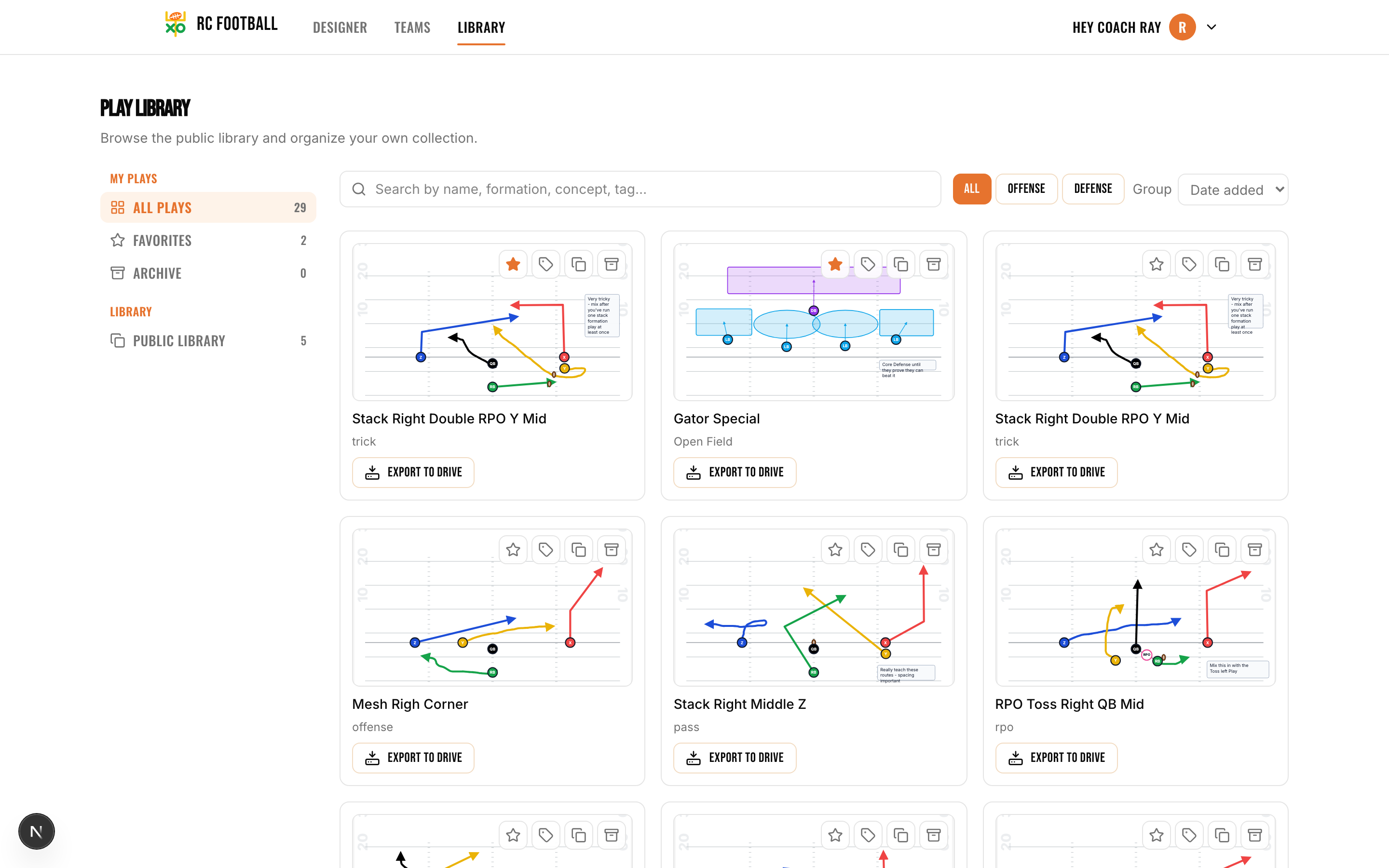
Every play you save lands in your library, searchable and synced to any device.
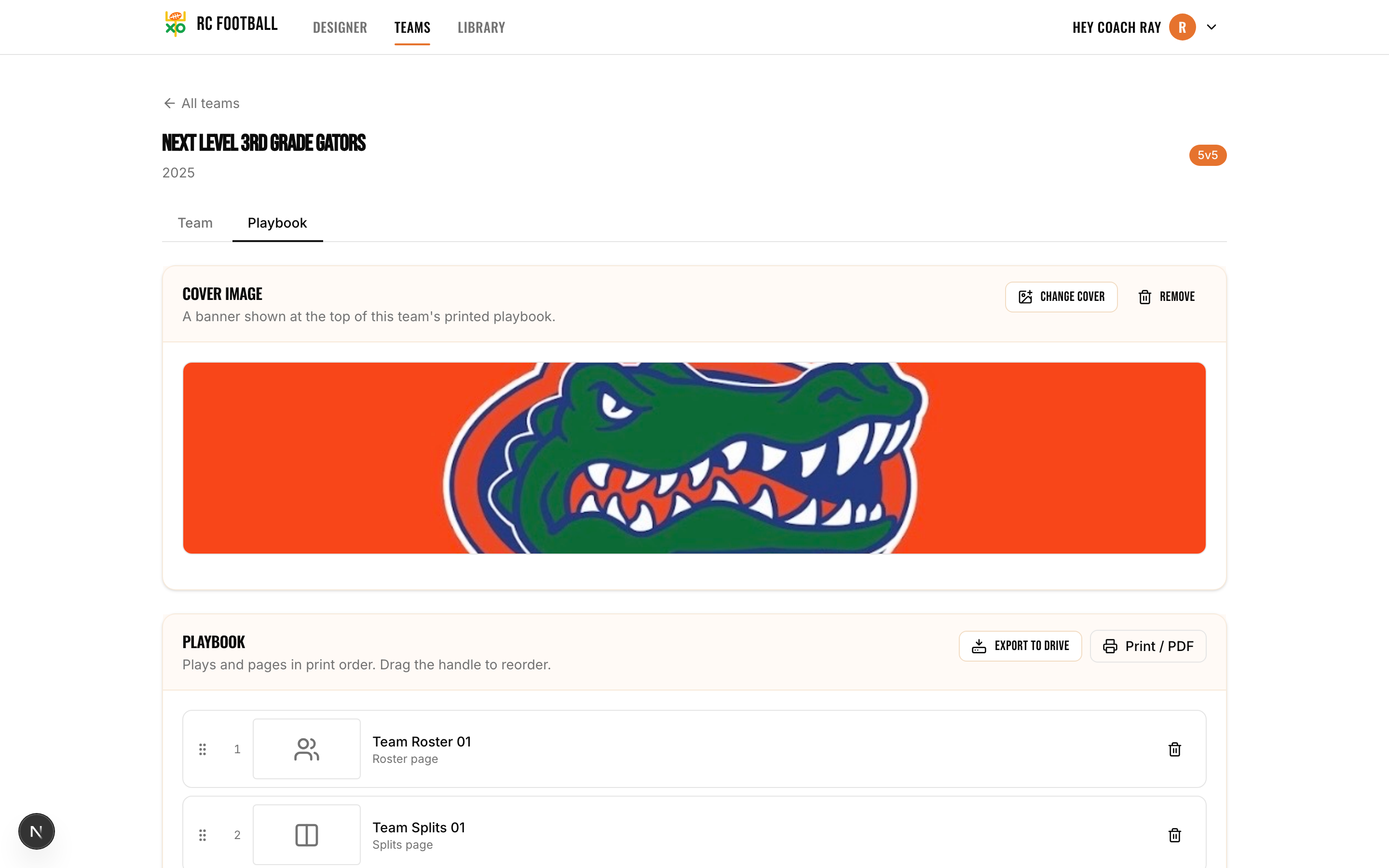
Organize plays into printable team playbooks: cover image, roster, and every play in order.
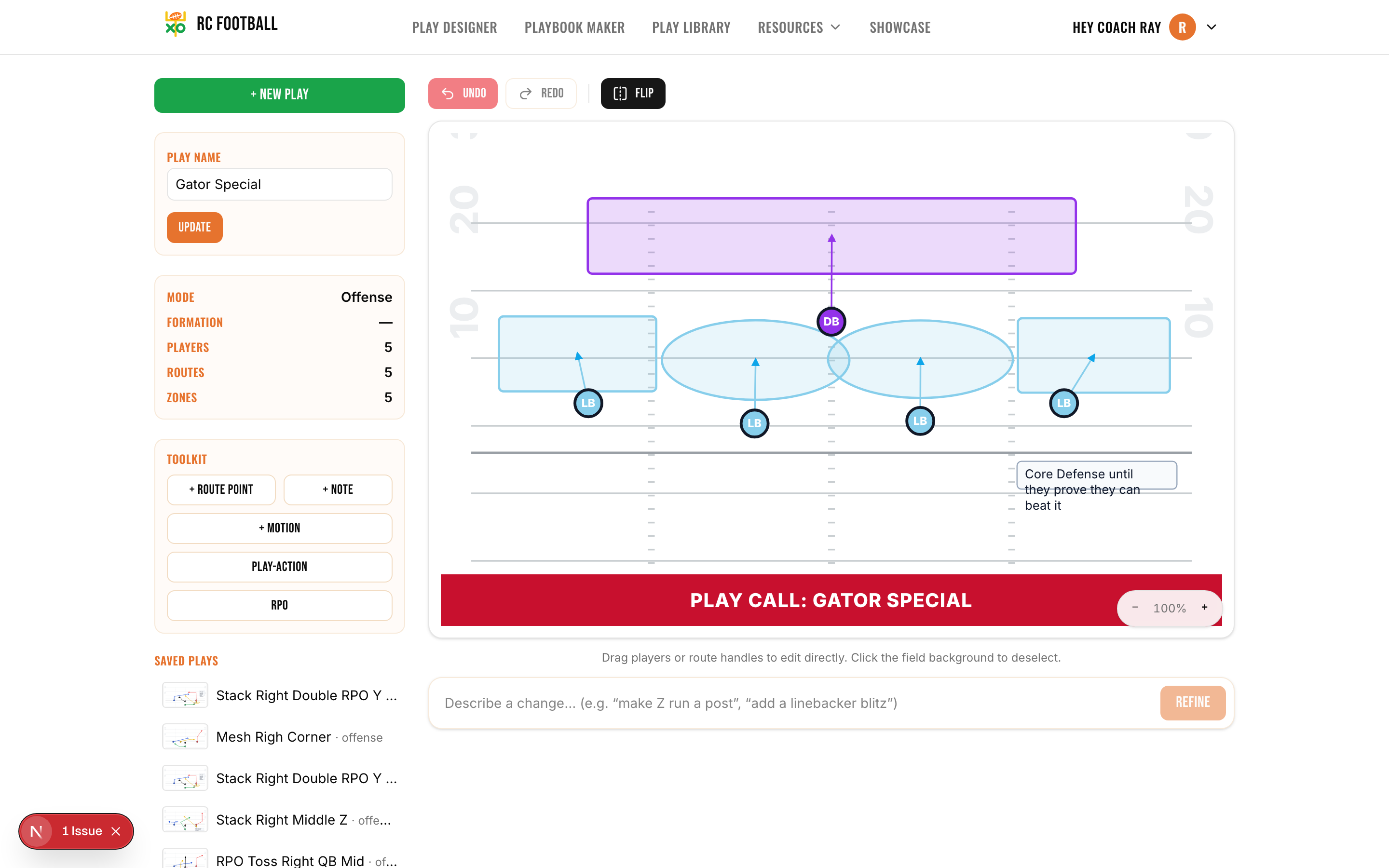
Design defense too. Drop coverage zones, mark blitzes, and stem each defender to the area they own.
Real Play Examples Built in the Designer
Mesh Concept: Trips Right
2nd and 7 · shotgun, trips to the boundary
Two receivers run shallow crossing routes at different depths to create a natural rub. The outside receiver runs a corner route to clear out the flat defender. If the crossers are covered, the back checks down as a safety valve. A staple for youth and high school offenses because the reads are simple and the mesh creates separation without needing elite speed.
Power Right: I-Formation
3rd and 1 · heavy personnel, short yardage
The backside guard pulls and kicks out the end man on the line of scrimmage. The fullback leads through the hole and picks up the first linebacker. The tailback follows the pulling guard and cuts upfield. Works at every level because it's physical, the assignments are clear, and it punishes defenses that over-pursue.
Four Verticals: Spread
1st and 10 · spread, pushing downfield
All four receivers run vertical routes, stretching the secondary sideline to sideline and deep. The quarterback reads the safeties: if they split, throw the seam; if they stay middle, throw the outside vertical. The running back leaks to the flat as a check-down. Aggressive but simple to teach, and it forces the defense to respect the deep ball on every snap.
Cover 3 Zone: 4-3 Defense
Base call · 1st and 10, balanced set
Three deep defenders split the field into thirds. The four underneath zone defenders cover the curls, flats, and hook areas. The front four rushes. One of the first defensive schemes most coaches install because it covers the deep ball, it's sound against the run, and players can learn their zones in a single practice.
Jet Sweep: Shotgun
1st and 10 · shotgun trips, attacking the edge
The Z receiver motions across the formation pre-snap and takes a direct handoff on the sweep path. The offensive line zone blocks away from the motion. The outside receiver cracks the force player. If the defense over-commits to stop the sweep, the quarterback keeps on a read and hits the backside. A constraint play that creates horizontal stress and makes the defense defend the full width of the field.
Fake Toss Boot Right: 5v5 Flag
1st and 10 · play-action off the edge
A 5v5 flag concept drawn entirely by hand in the designer, with no formation template. The quarterback fakes the toss left, rolls right off play-action, and works the crossing route as the primary read with a checkdown underneath. It shows how the same tools that diagram 11-man schemes scale straight down to flag: every route is drawn by clicking and dragging.
Want to see more? Browse the Play Library for community-shared plays you can copy and customize.
Who Uses This Play Designer
- Youth flag football coaches building a playbook for the first time and need something visual to hand kids at practice
- Pop Warner and rec league coordinators who want organized play sheets without paying for software
- High school offensive coordinators diagramming their weekly game plan and printing scouting cards
- High school defensive coordinators installing fronts, coverages, and blitz packages for their staff
- Varsity position coaches creating individual route trees and technique sheets for their players
- Coaching students and aspiring coaches studying play design and building a portfolio of concepts
- Football dads and volunteer coaches who got handed a clipboard and need to look like they know what they're doing
- 7-on-7 tournament coaches designing quick-tempo passing concepts for summer competition
Frequently Asked Questions About the Play Designer
Is the football play designer free?
Do I need to download any software?
Can I save plays and come back to them later?
Can I print my play diagrams?
What formations are available?
Can I design both offensive and defensive plays?
Is this good enough for high school football?
Can I share plays with my coaching staff?
How is this different from drawing plays on a whiteboard?
The play designer is free to start. When your program needs heavier usage or advanced features, see plans & pricing.
Keep exploring
Start Building Your Playbook
Describe your first play in plain English and see it drawn on the field in seconds. Free to try, no sign-up.
Open RC Football Play Designer