Plan flag and tackle football practice. Print it. Run the clock.
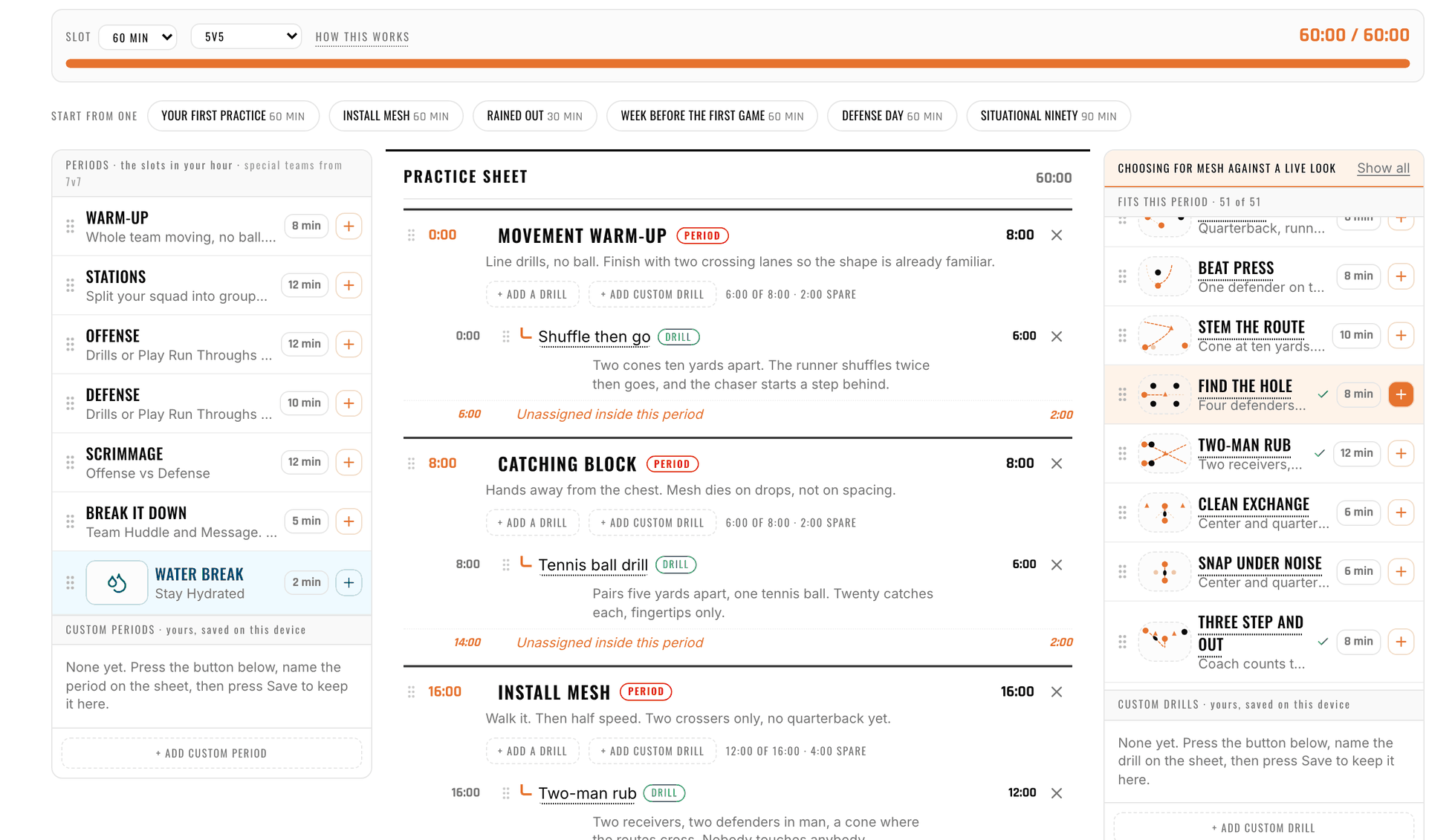
The RC Football practice planner puts a tray of periods and 51 drills on the left and your practice sheet on the right. Drag a block across and the clock bar tells you how much of the hour is gone. When it adds up, print it on one page, or open it on your phone at the field and let the clock run the session.
The Same Plan, Running on the Field
Now
Warm-up
0:12
Coming up
Stations12:00
Offense12:00
Run it from your pocket
Build the plan at the kitchen table, then open it on the field. The clock runs the blocks, the whistle goes ten seconds before every change and again when it is time to switch, and +2 min is there because practice never runs to schedule.
Periods in the tray
- Warm-up
- Stations
- Offense
- Defense
- Special teams
- Scrimmage
- Break it down
- Water break
One Plan, Three Ways to Use It
A practice plan is a list of timed blocks, and the planner gives you that one list three ways: a builder to assemble it, a sheet to print, and a clock to run it on the sideline. Change it in one place and the other two follow. Drag periods (warm-up, stations, offense, defense, scrimmage, a water break) and any drill in the drill library onto the sheet, and the clock bar reacts as you go. Not starting from zero? 6 sessions are already built and timed, and any of them opens in the planner for you to change. Draw the plays the plan calls for in the play designer.
What the planner does
- Drag and drop periods and 51 drills from the tray onto the sheet.
- A clock bar that reacts so you see the hour fill as you build, not after.
- Set any block from 1 to 90 minutes for this practice only, or as your default.
- Custom periods and drills for the thing your team does that nobody else does.
- Print on one page or with every drill's directions and detail attached.
- Run it from your phone with a whistle before every change and +2 min when practice runs long.
How the Practice Planner Works
- 1
Start from a blank hour or a ready plan
Open the planner and start with a warm-up on the sheet, or pick one of the 6 ready sessions under the clock bar and change it from there.
- 2
Drag blocks from the tray
Periods on one side, drills on the other. Drop a block between any two rows. Drop a drill into a period and it is filed under it, so the sheet reads the way practice runs.
- 3
Watch the clock bar
Every block you add, remove or stretch moves the clock. Trim a drill, cut a period, or add a water break until the plan fits the time you have on the field.
- 4
Print the sheet
One page for your clipboard, or the full version with every drill's setup and coaching points attached for the helpers running stations.
- 5
Run it from your pocket
Open the plan on your phone at the field. The clock runs each block, the whistle sounds ten seconds before a change and again at the change, and +2 min buys time when a drill needs it.
Built for the Hour You Actually Have
The tray
Periods and drills, side by side
Everything you can put in a practice, in one place: 8 kinds of period and 51 drills from the library, each carrying its own minutes. Pick your game format and the tray offers the periods that fit it.
The sheet
What you print and hand out
The practice in order, with minutes on every block, notes on any block, and each drill named so a helper knows what to set up. It prints on a single page, or with the drill directions attached behind it.
The clock bar
The hour, filling as you build
The bar above the sheet shows how much of your slot is spoken for. It is the difference between a plan that looks right and a plan that ends on time, and you see it before you print, not at the field.
Run mode
The plan as a sideline timer
The same plan, one block at a time, on your phone. A whistle warns you ten seconds out and again when it is time to switch, and +2 min is there because practice never runs to schedule.
Looking for a drill to build around? The drill library filters by skill, age and what went wrong, and every drill there can be added straight to a plan.
Who Uses the Practice Planner
- First-year flag coaches who have sixty minutes on a Tuesday and no idea how to fill it
- Volunteer coaches who plan at the kitchen table and need the sheet ready before they leave
- Head coaches handing assistants a printed plan with the drill directions attached
- Coaches who keep losing track of time at practice and want the clock to call the changes
- League directors giving every new coach the same starting session
Practice Planner FAQ
Does it work for tackle football practice?
I need flag football practice ideas. Where do I start?
Is the practice planner free?
Where do the drills come from?
Can I change how long a block runs?
Can I add my own drills?
How do I use it at the field?
Can I print the practice plan?
Keep exploring
Plan tomorrow's practice tonight.
Drag in the blocks, watch the hour fill, print the sheet.
Open the Practice Planner